Rockwell SETPOINT™

£154.00

One razor. The right setting for today's shave. Turn the dial for a gentler pass or open the gap to give longer hair more room.

Material
Finish
316L stainless steelA heavier feel in the hand, CNC-machined from solid stainless steel.

Complete your setup

Secure checkout. Prices shown in GBP.

Continuous dial from 1 to 6
Solid two-piece head
Uses standard double-edge blades
What's included

One SETPOINT™ razor in your selected material and finish. Blade bundle and packaging contents are being confirmed.

Specifications

Stainless Steel · 316L stainless steel · Continuous 1–6 dial · Two-piece head · Standard double-edge blades.

Shipping and returns

100-day returns, no questions asked. Shipping options and charges are shown at checkout. See our shipping policy and return policy.

WHY ADJUSTABLE RAZORS?

Your face isn’t one shaving surface.
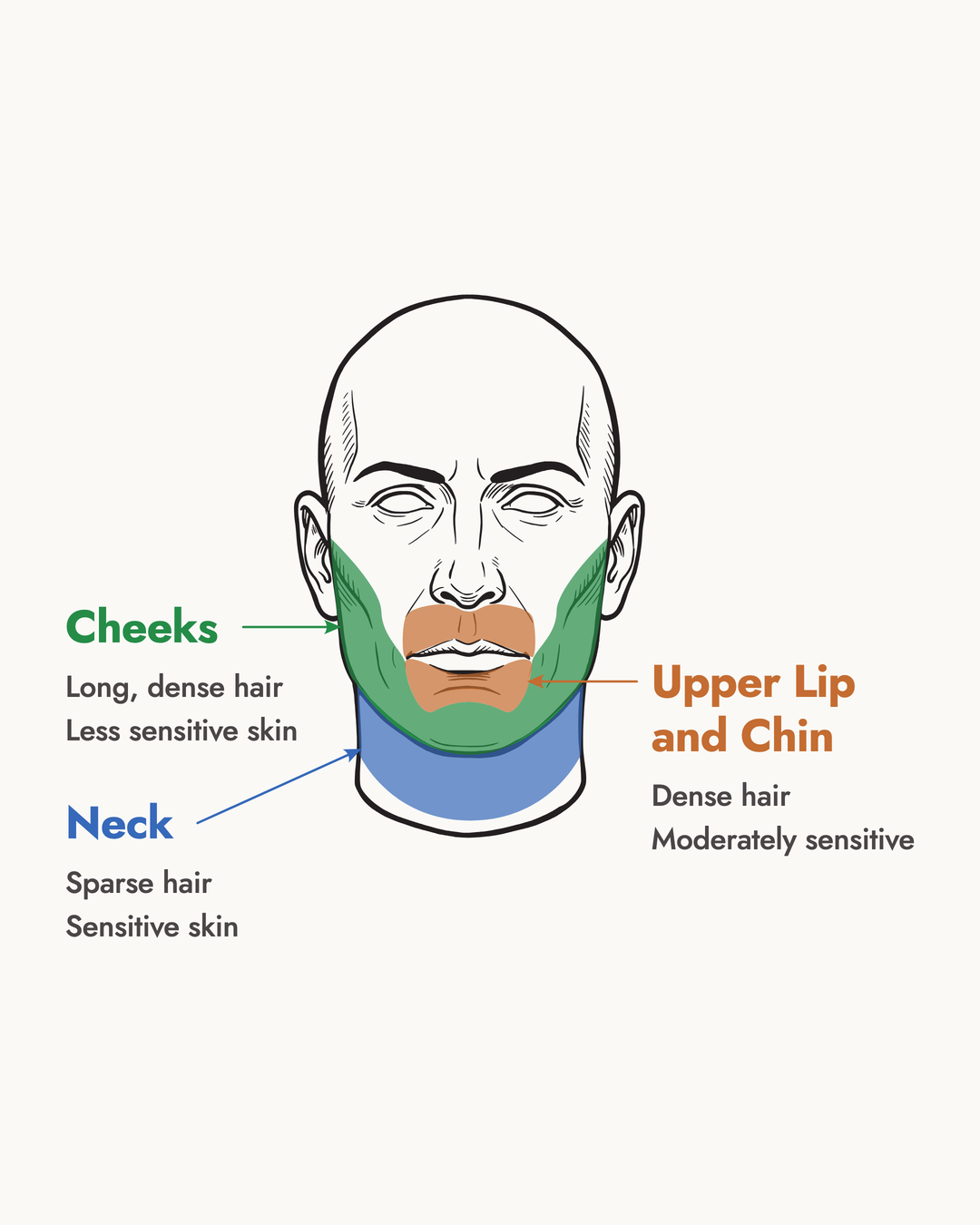
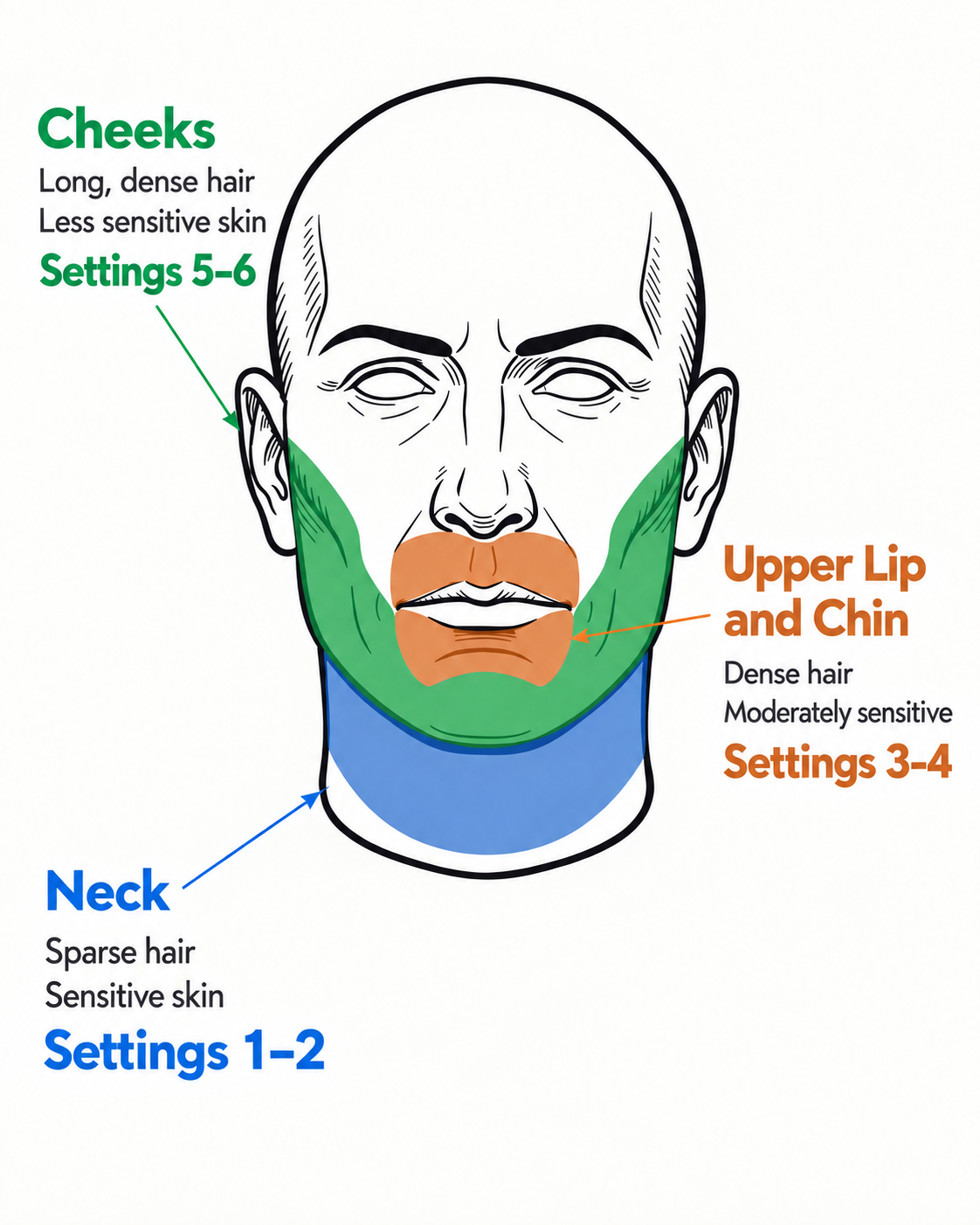
Infographic showing different shaving zones across the face

Different regions of your face have different hair lengths, density and skin sensitivity. One fixed setting razor treats every area the same. Hence you need an adjustable razor allows you to adjust the blade gap to adapt to the region you’re shaving.
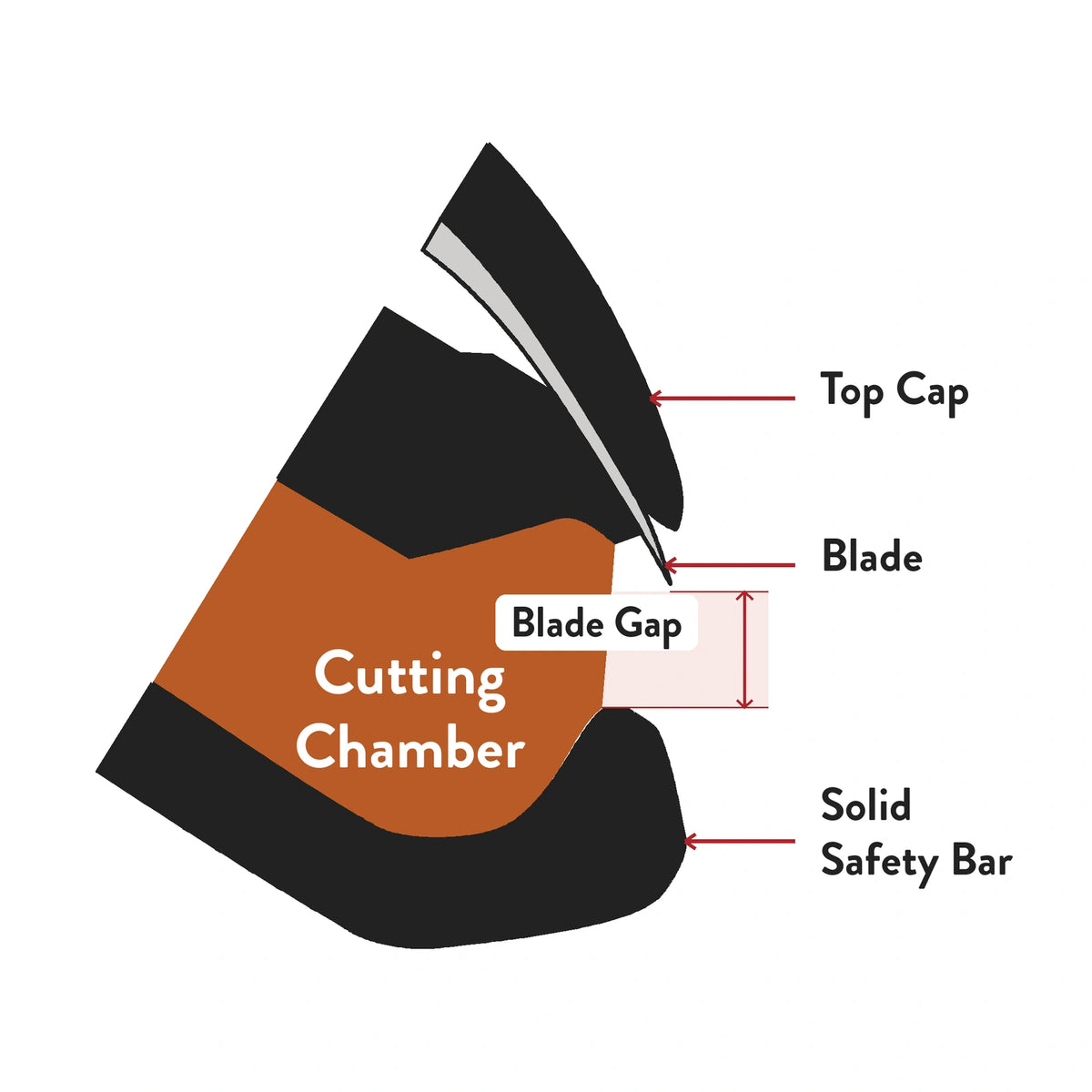
What is blade gap?

Diagram showing the blade gap between the blade and safety bar

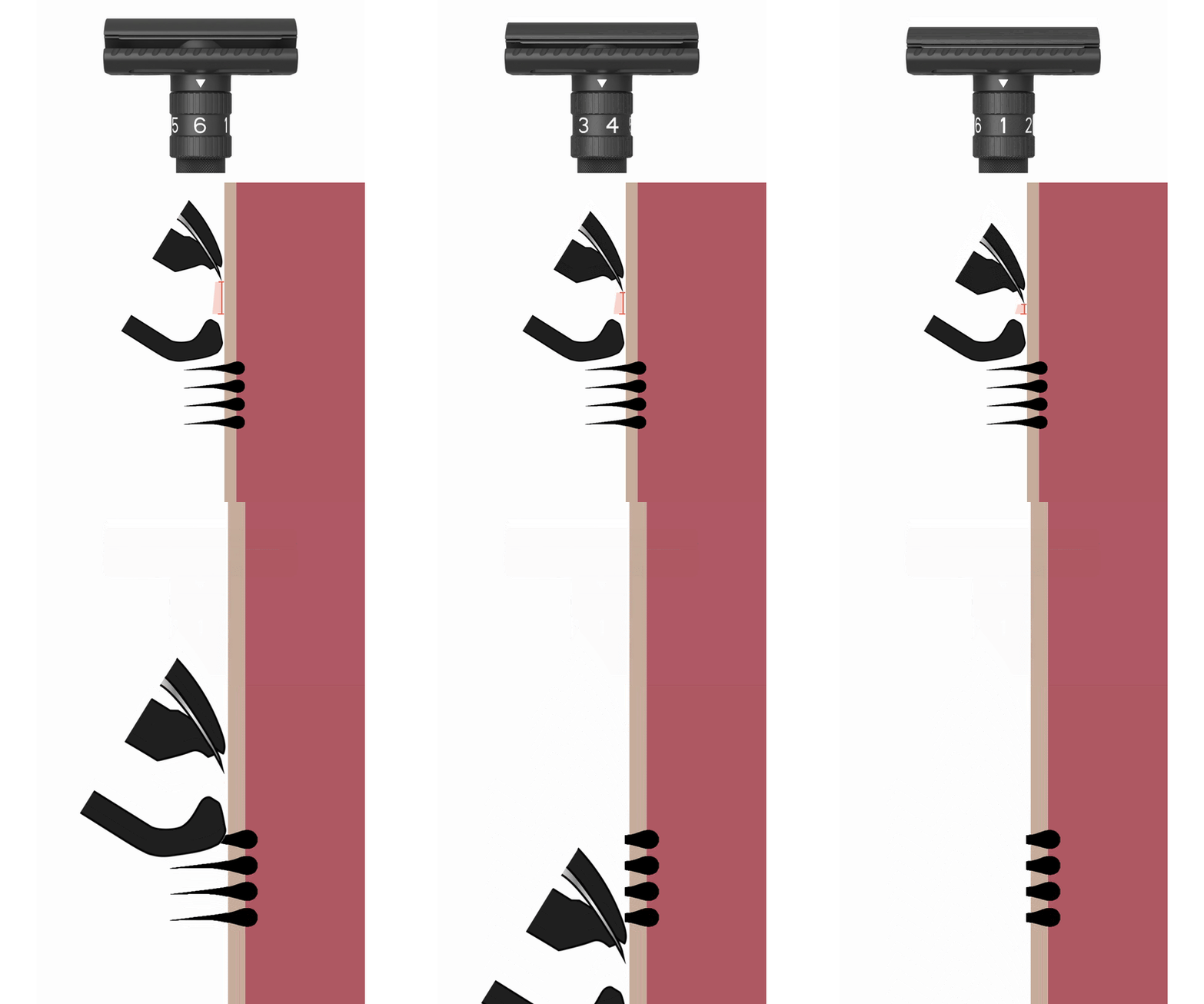
Blade gap is the distance between the blade and the solid safety bar. It determines how much space there is for hair to enter the cutting chamber before it meets the blade.

Let’s start with shorter hair and a razor with a small blade gap.

Short hair can enter a smaller cutting chamber perfectly and gets a nice, clean cut. A small blade gap is ideal for shorter hair or areas where the hair is sparse.

But as the hair grows, that same small blade gap becomes less effective.

The safety bar presses longer hair down, but the small opening leaves less room for it to rise into the cutting chamber. The blade may cut the hair unevenly, requiring additional passes.

With longer hair, a larger blade gap can give you a better shave.

A larger opening gives longer hair more room to enter the cutting chamber and meet the blade. This helps the razor cut the hair more efficiently on the first pass.

But that larger blade gap causes skin irritation for shorter hair.

If the blade gap is too big and the hair is short or sparse, there's more chance of the blade making contact with your skin, which causes skin irritation.

With a fixed-gap razor, changing the blade gap means changing the razor.

A fixed-gap razor gives you one blade gap for every hair length, shaving area and level of sensitivity. To get a different gap, you need a different razor.

Why SETPOINT™?

SETPOINT™ gives you multiple blade gaps in one razor.

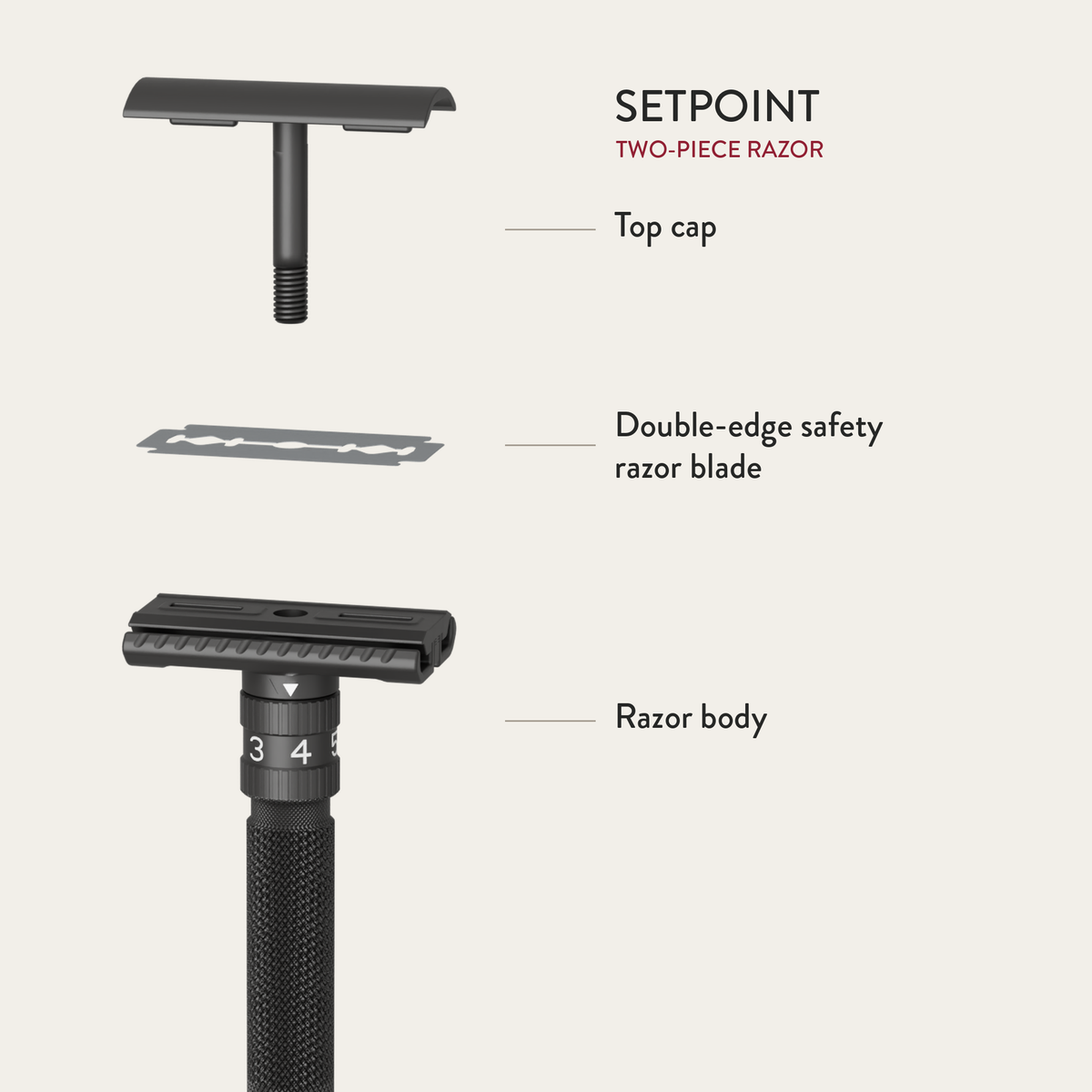
SETPOINT two-piece head, blade and razor body

SETPOINT™ is a two-piece, CNC-machined safety razor with a precision adjustment dial that allows you to change the blade gap with a simple twist, based on the area you’re shaving.

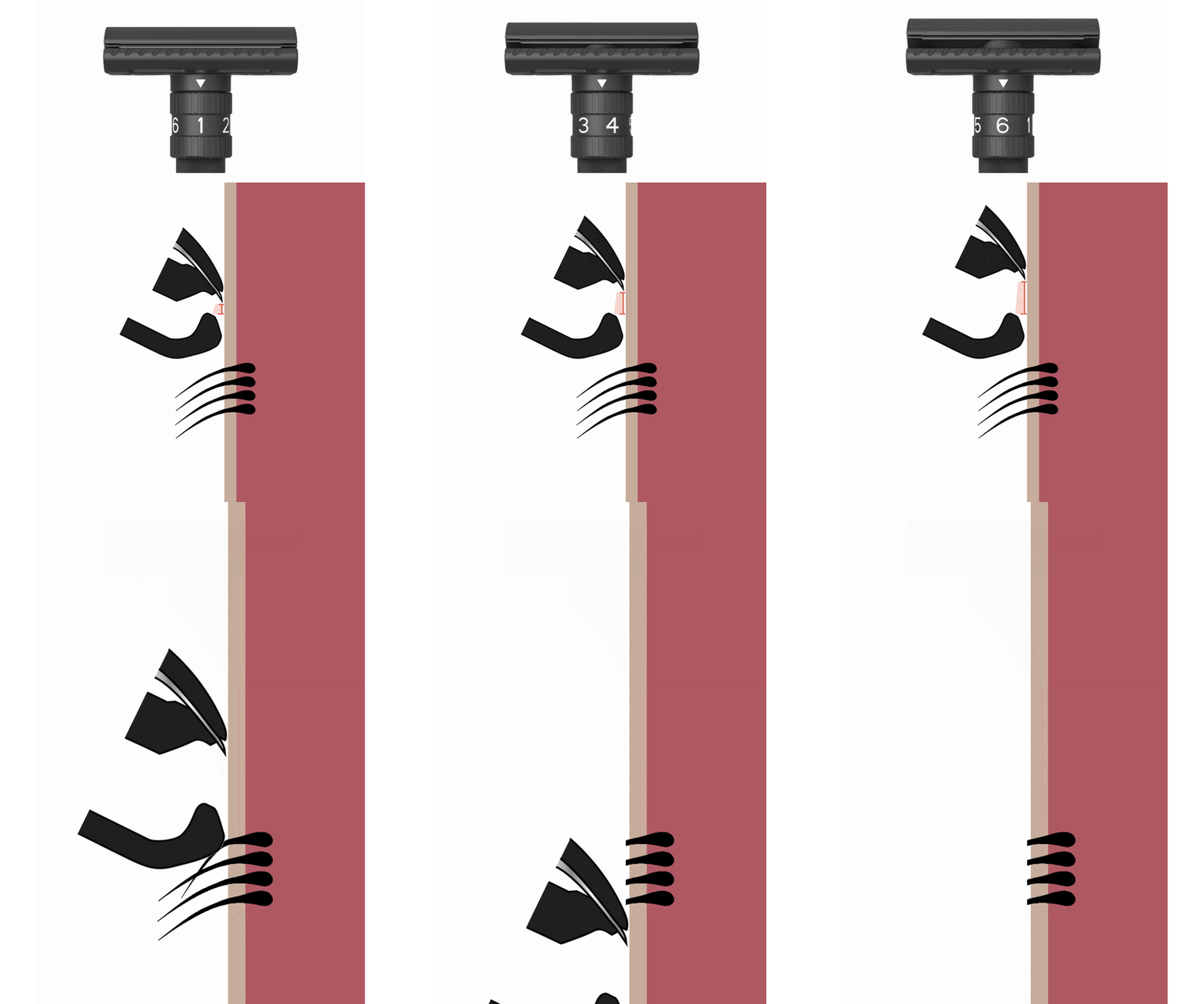
For shorter hair, twist the dial to a smaller blade gap.

SETPOINT adjusted to a smaller blade gap for shorter hair

Turn the dial down to reduce the blade gap. The smaller opening gives shorter hair a controlled path to the blade and provides a gentler shaving experience.

For longer hair, twist the dial for a larger blade gap.

SETPOINT adjusted to a larger blade gap for longer hair

Turn the dial up to create more room in the cutting chamber. Longer or denser hair can enter more easily and meet the blade for a cleaner, more efficient cut.

One razor, adjusted for the shave in front of you.

SETPOINT adjustable safety razor

From shorter hair to longer growth, and from your cheeks to sensitive areas, SETPOINT™ lets you choose the blade gap that feels right for each part of your shave.

Dial guide

Find your setting.

01

1–2 · Gentle

A starting point for sensitive areas or short hair.

02

3–4 · Everyday

A starting point for a regular shave.

03

5–6 · More growth

A wider gap for longer or denser hair.

Assembly

  1. The numbered dial sets the shave. The knob at the end of the handle releases the top cap for a blade change.
  2. Release the cap Turn the knob at the end of the handle and lift the top cap away.
  3. Place the blade Lay a standard double-edge blade on the base plate (the part beneath the cap), holding it by the short ends.
  4. Secure and set Press the cap back down and turn the end knob until it locks. Then choose your dial setting.
  5. Press down and lock
  6. Turn the bottom knob until it locks
  7. Set your dial Set it anywhere from 1 to 6, and shave.

Handle blades carefully and store used blades in a suitable blade safe.

In the hand

Built to be held. Made to last.

Rockwell promise

100-day returns, no questions asked.

Try SETPOINT™ for 100 days from delivery. If it is not right for you, send it back—no questions asked.

Read the return policy
FAQ

Questions, answered.

01

What blades does SETPOINT™ use?

Any standard double-edge safety razor blade.

02

Where should I start?

Start at a lower setting and increase it gradually until you find a comfortable shave.

03

Can I adjust it mid-shave?

Yes. Turn the dial as you move between areas.

04

How is it different from the T2?

Both have an adjustable dial. SETPOINT has a solid, two-piece head; the T2 uses butterfly doors for blade loading.

05

What if SETPOINT™ is not right for me?

Return your razor within 100 days of delivery, no questions asked. See the return policy for shipping and refund details.